
Scan media
Upload an image or video
OR
Paste an image link
Quick Scanning Tips
- If you can't download or directly scan from a URL, try a screenshot!
- Low quality, blurry, or out-of-focus images/videos can throw off results. Try opening the full screen version or using the original copy if available.
- Toren is constantly keeping up with changing tech and AI advancements — Help us improve!
Image authenticity
AI Image Detector
Toren can be a great tool to help identify different AI content. Check for AI generated, edited, or manipulated images and videos.
25 free tokens
Use tokens to run scans
Quick to use
Upload, scan, review the result
Clear explanation
See the result with confidence context
Use the guest scanner below, or log in to your account.
25
free tokens
Guest scanning is available below. Create an account for 25 starter tokens.
Images cost 2 tokens See all token costs.
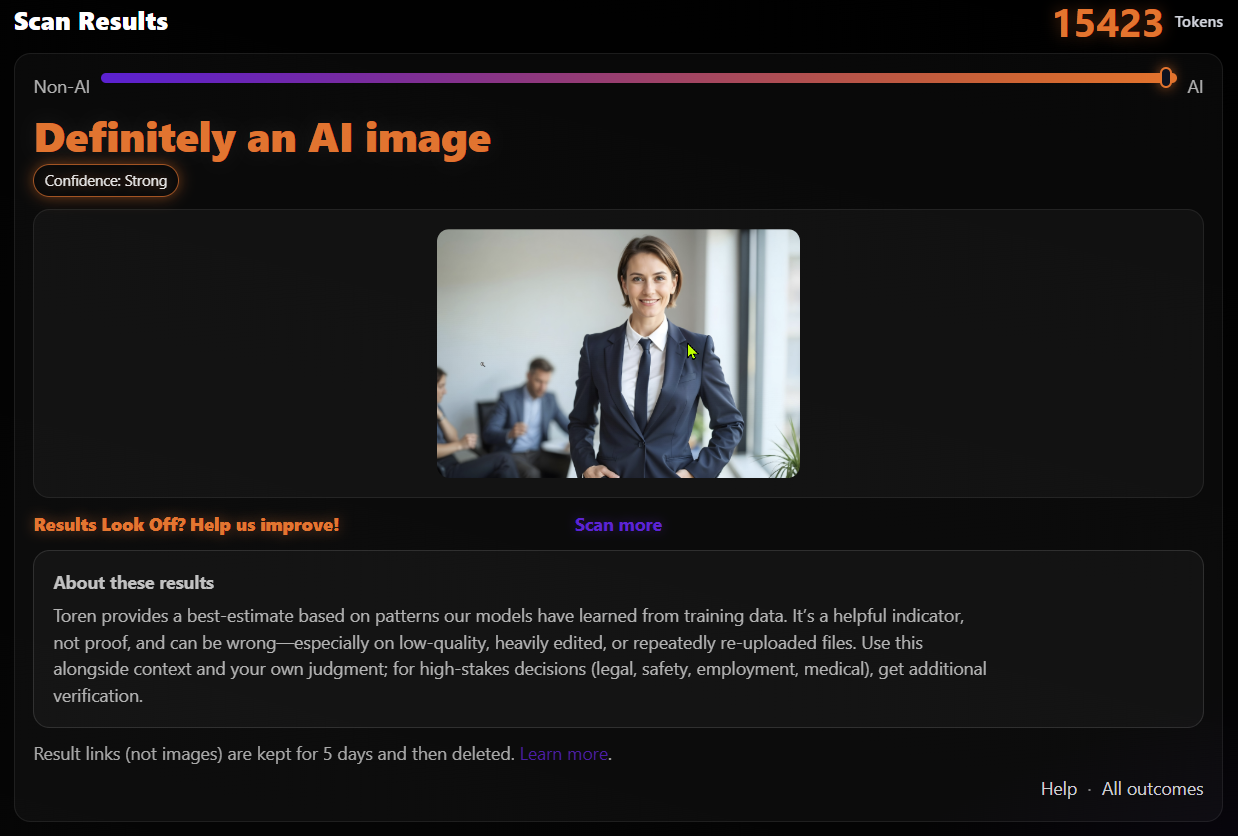
How the AI image detector works
- Upload the image
- Analyze visible AI-style signals
- Read the result and confidence
Tip: You can use the original, cropped, or a screen shot of an image or video.
When to use it
- Checking whether a viral image is AI-generated
- Reviewing suspicious profile photos
- Spotting altered or misleading screenshots
- Checking whether AI art is being passed off as a real photo
What you get
- An AI-signal outcome that ranges from no strong AI signals to strong AI-generation signals
- A confidence score for the scan
- A better way to decide whether an image looks real
No detector is perfect. Use this along with common sense and source checks.
How to assess whether an image is real
A visual review can provide context before or after a scan, but no single artifact proves that an image is AI-generated. Look at the whole image and verify its source when the stakes are high.
Visual details worth checking
- Inconsistent hands, teeth, jewelry, text, or other small details
- Reflections, shadows, or lighting that do not agree
- Repeated or swirled background patterns
- Unnatural skin texture, hair edges, or object boundaries
These familiar warning signs are not conclusive, and well-made generated images may not show them. Use them as a quick guide and cause for closer inspection.
When source checks matter most
- Breaking news or images presented as proof
- Money requests and urgent messages
- Celebrity, political, or other shock content
- Viral posts intended to provoke controversy
Check who first published the image, whether trusted sources provide the same context, and whether an earlier version exists. Combine that work with the detector result instead of relying on either one alone.
Image detection beyond the original file
Online images rarely remain pristine originals. Screenshots, resizing, compression, cropping, re-saving, social networks, and messaging apps can all change a file. Toren is capable of scanning all variations but the more an image is edited or re sampled, the less reliable the detection may be.
Screenshots
A screenshot taken on a phone or other device can be uploaded as-is. You do not need to crop away the phone or screenshot edges, Toren automatically removes borders and extra pixels that would throw off the scan. The original is always best, but a high quality screenshot will give you very similar results.
Cropping
Cropped images can still be checked for AI generated signals but if an image was partially altered by AI and the AI portion is cropped Toren won't find any AI evidence.
Compression and re-saving
Compression removes or changes image information. Toren is trained and tested with different forms and levels of compression to account for social media, website, and other common compression methods. Heavy compression or repeated re-encoding will eventually degrade the AI evidence making it harder to detect AI signals.
Resizing, thumbnails, and upscaling
Resized and enlarged images can be analyzed, but downscaling too far can reduce AI signatures making detection harder. Thumbnail-sized images or copies reduced to only a few kilobytes may not contain enough evidence for a strong determination. Upscaling a small image or thumbnail does not restore lost information so if a small grainy photo is made bigger, Toren would still not be able to properly analyze the image or video.
What the image result means
An evidence-based assessment
The result reports an AI-signal outcome and confidence context. No matter how good a scanner is, real photos can sometimes show AI-like visual or statistical characteristics, while generated images can sometimes appear strongly realistic. Editing, filtering, computational photography, sharpening, denoising, compression, and unusual visual conditions can also affect the evidence.
Metadata is optional context
Toren does not require image metadata. Metadata can provide useful context when present, but screenshots, social platforms, messaging services, and image editors may strip, rewite or even spoof metadata. Detection doesn't rely on metadata but can use it when it is usefull. See how to read results for more detail.
AI Image Detector FAQ
Can an AI detector detect screenshots?
Yes. Toren can analyze screenshots without requiring the original image or metadata. The fastest way to scan is to take a quick screenshot of the video or image and run it through Toren.
Can I screenshot an image on my phone and upload it?
Yes. Upload the phone screenshot directly. You do not need to crop its edges or clean up the image in any way.
Can cropping fool an AI image detector?
Ordinary cropping does not inherently erase AI characteristics in the portion that remains. A crop can matter if it completely removes the only AI-generated region or leaves too little image information to analyze.
Does compression affect AI image detection?
It can. Toren accounts for varied compression conditions, so normal web compression does not automatically defeat detection. Strong or repeated compression removes more detail and can make the result less certain.
Can an AI detector analyze resized images?
Yes. Downscaling removes detail as an image gets smaller, while upscaling cannot recreate detail already lost. For the strongest available evidence, scan the largest clear copy you can find.
Why are tiny images harder to detect?
Tiny dimensions and very small file sizes can remove the fine visual patterns used in an assessment. A thumbnail or heavily reduced copy may not contain enough evidence for a confident result.
Does AI image detection require metadata?
No. Toren analyzes images without requiring metadata. Metadata can add context, but it is often stripped or changed when an image is shared, edited, re-saved, or captured as a screenshot.
Can real images be mistaken for AI?
Yes. Some real images have characteristics that resemble synthetic imagery, especially after strong editing, filtering, denoising, sharpening, compression, blurry or unusual capture conditions.
Can AI-generated images be mistaken for real images?
Yes. False negatives can occur, just as false positives can. Treat the result as one source of evidence and consider the image source and surrounding context.
Do I have to sign up to scan?
No. This page includes a free guest scan allowance. New accounts start with 25 tokens for account scanning.
Related guides
See the help guide for scan options, token costs, and how to get better results from low-quality files.